OpenAPI & Swagger
Okapi provides automatic OpenAPI documentation generation with built-in interactive UIs. The documentation is generated from your route definitions, ensuring it stays in sync with your API implementation.
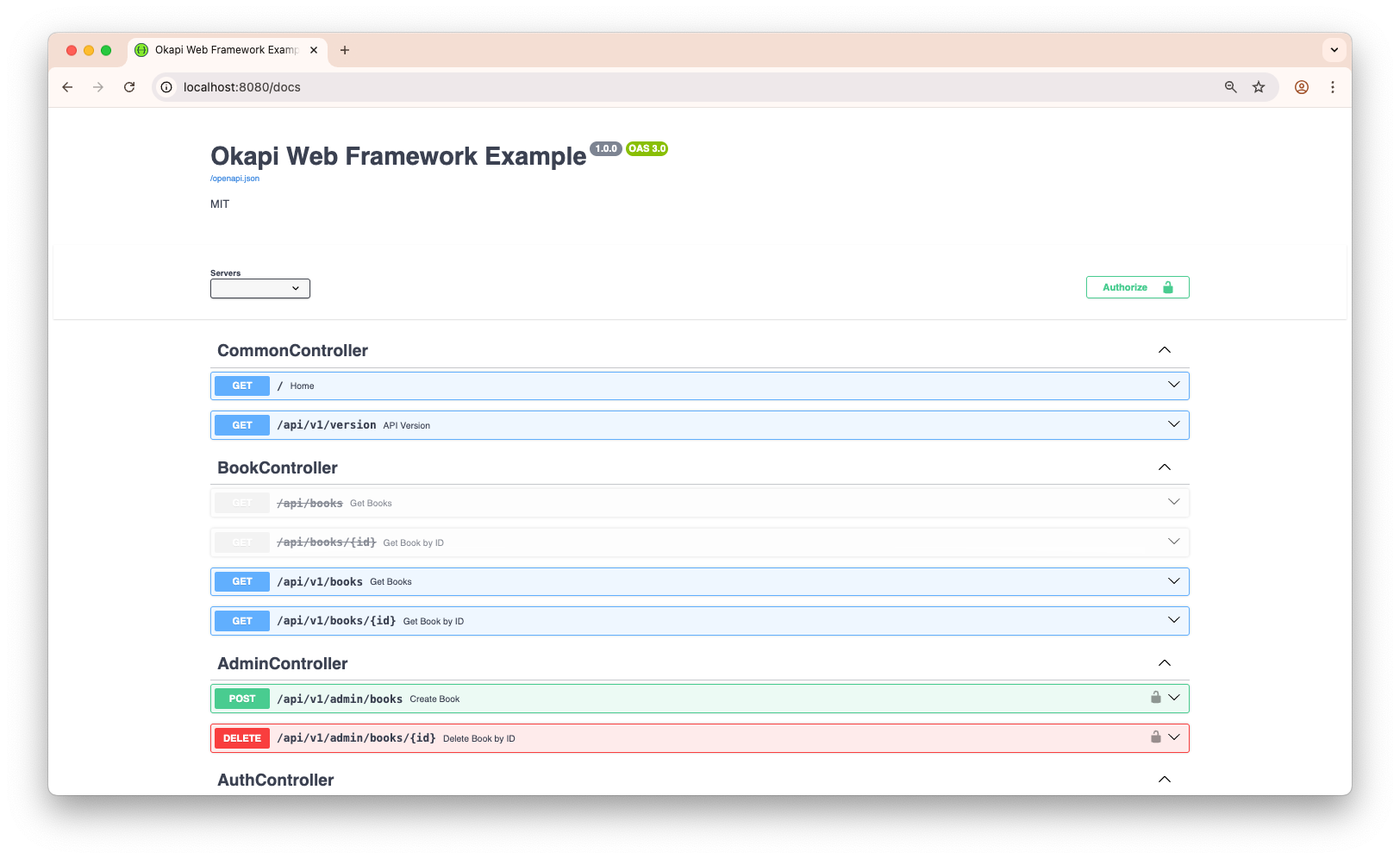
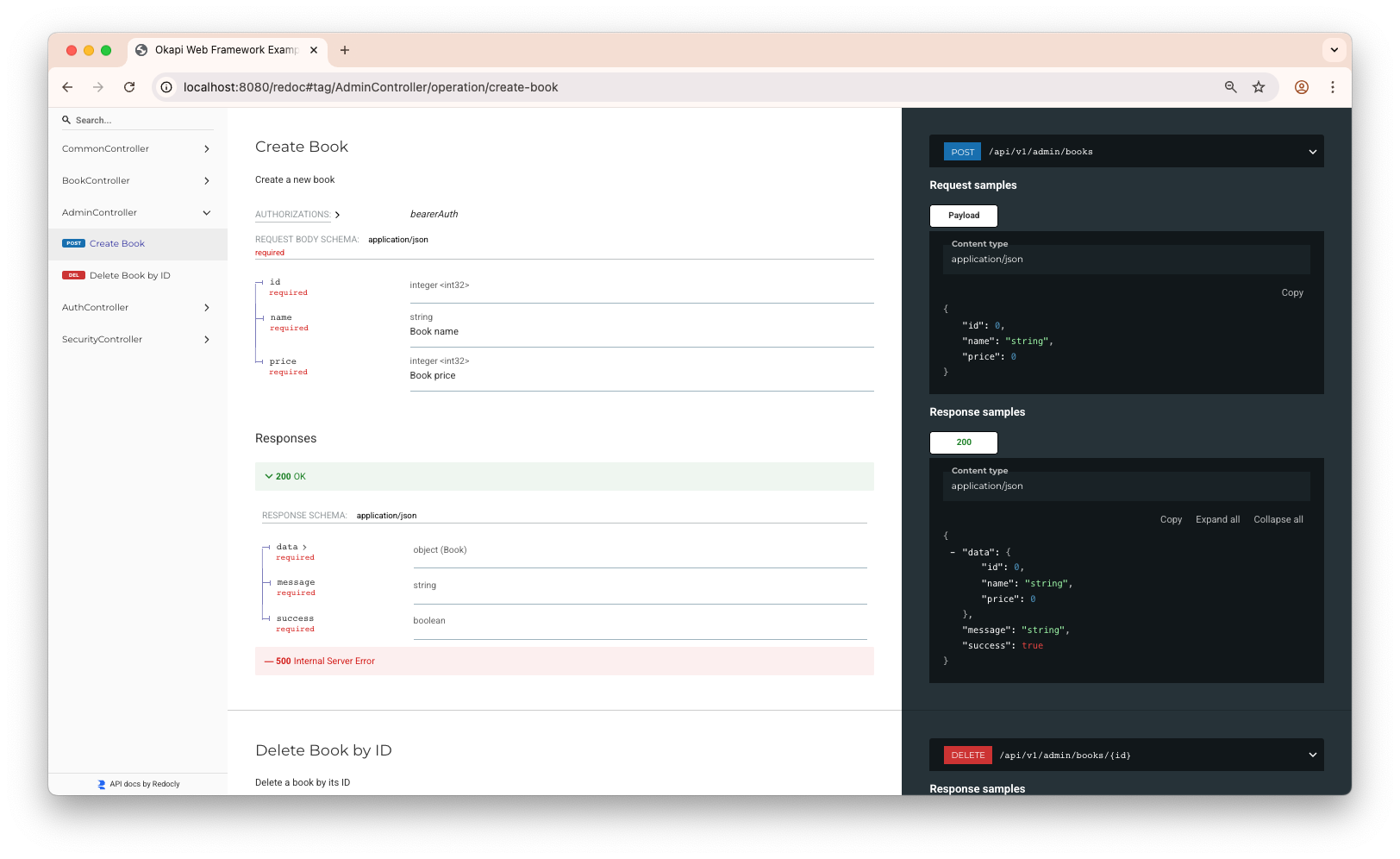
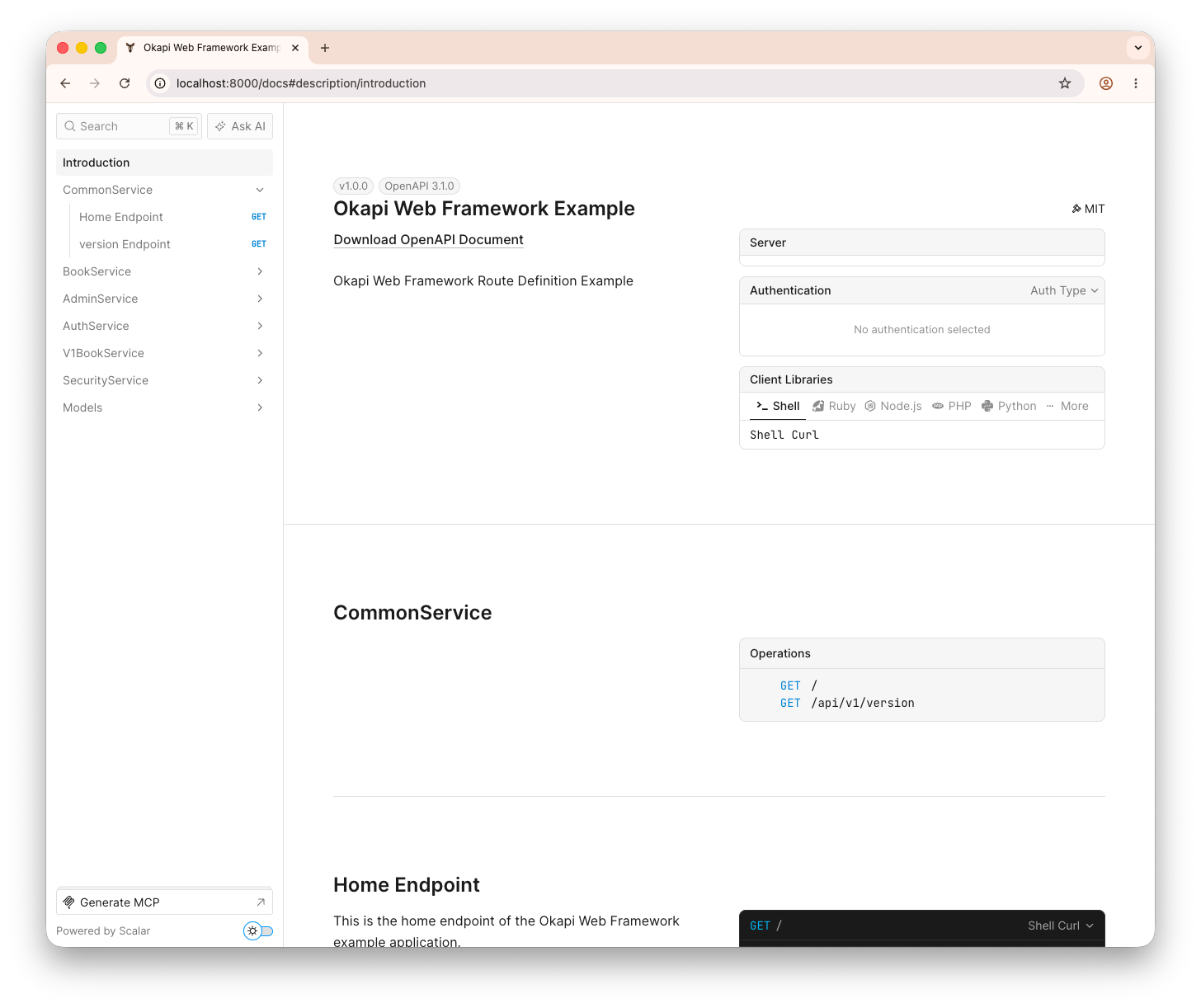
Okapi serves both OpenAPI 3.1 (the default) and OpenAPI 3.0, and ships with three interactive UIs out of the box — Swagger UI (default), ReDoc, and Scalar — with the UI rendered at /docs fully selectable.
The document is built when documentation is enabled and again when the server starts, so it reflects the routes registered up to that point. Routes that are hidden, disabled, or belong to a disabled group are left out. Toggling a route or group after the server is running changes what the router answers; it does not rebuild the published document.
Quick Start
Using okapi.Default()
Documentation is enabled by default and served at /docs:
o := okapi.Default() // Docs available at /docs
Using okapi.New() with WithOpenAPIDocs()
If you initialize Okapi with okapi.New(), documentation is disabled by default. Enable it with WithOpenAPIDocs():
o := okapi.New()

if os.Getenv("ENABLE_DOCS") == "true" {
    o.WithOpenAPIDocs()
}
Custom Configuration
Customize the OpenAPI documentation:
o := okapi.New().WithOpenAPIDocs(
    okapi.OpenAPI{
        Title:   "Example API",
        Version: "1.0.0",
        Contact: okapi.Contact{
            Name:  "API Support",
            Email: "support@example.com",
        },
    },
)
Security Schemes
Define authentication mechanisms for your API:
o.WithOpenAPIDocs(okapi.OpenAPI{
    Title:   "Okapi Web Framework Example",
    Version: "1.0.0",
    License: okapi.License{Name: "MIT"},
    SecuritySchemes: okapi.SecuritySchemes{
        {
            Name:   "basicAuth",
            Type:   "http",
            Scheme: "basic",
        },
        {
            Name:         "bearerAuth",
            Type:         "http",
            Scheme:       "bearer",
            BearerFormat: "JWT",
        },
        {
            Name: "OAuth2",
            Type: "oauth2",
            Flows: &okapi.OAuthFlows{
                AuthorizationCode: &okapi.OAuthFlow{
                    AuthorizationURL: "https://auth.example.com/authorize",
                    TokenURL:         "https://auth.example.com/token",
                    Scopes: map[string]string{
                        "read":  "Read access",
                        "write": "Write access",
                    },
                },
            },
        },
    },
})
Applying Security to Routes
Single Route
var bearerAuthSecurity = []map[string][]string{
    {"bearerAuth": {}},
}

o.Get("/books", getBooksHandler).WithSecurity(bearerAuthSecurity...)
Route Group
api := o.Group("/api", jwtMiddleware).WithSecurity(bearerAuthSecurity)
api.Get("/", apiHandler)
Documenting Routes
Okapi offers multiple ways to document your routes.
1. Composable Functions (Direct Style)
Simple and readable approach for small to medium routes:
o.Get("/books", getBooksHandler,
    okapi.DocSummary("List all available books"),
    okapi.DocTags("Books"),
    okapi.DocQueryParam("author", "string", "Filter by author name", false),
    okapi.DocQueryParam("limit", "int", "Maximum results to return", false),
    okapi.DocResponseHeader("X-Client-Id", "string", "Client ID"),
    okapi.DocResponse([]Book{}),
    okapi.DocResponse(400, ErrorResponse{}),
    okapi.DocResponse(401, ErrorResponse{}),
)
okapi.DocResponse(v) with a single argument always documents the 200
response. Pass the status code explicitly — okapi.DocResponse(201, v) — for
anything else.
2. Fluent Builder Style
For complex or dynamic documentation:
o.Post("/books", createBookHandler,
    okapi.Doc().
        Summary("Add a new book to the inventory").
        Tags("Books").
        BearerAuth().
        ResponseHeader("X-Client-Id", "string", "Client ID").
        RequestBody(BookRequest{}).
        Response(201, Book{}).
        Response(400, ErrorResponse{}).
        Response(401, ErrorResponse{}).
        Build(),
)
3. Body Field Style
Using structs with a field named Body:
type BookRequest struct {
    Body struct {
        Name  string `json:"name" minLength:"4" maxLength:"50" required:"true"`
        Price int    `json:"price" required:"true"`
    }

    ID     int    `param:"id" query:"id"`
    APIKey string `header:"X-API-Key" required:"true"`
}

o.Post("/books", createBookHandler,
    okapi.Request(&BookRequest{}),
    okapi.Response(&BookResponse{}),
)
okapi.Request and okapi.Response shape the OpenAPI document. They do not
bind or validate the request at runtime: the validation tags on BookRequest
take effect where the handler binds it, with c.Bind(&in) or through
okapi.Handle / okapi.H.
Using .WithIO(), .WithInput(), .WithOutput()
// Both request & response
o.Post("/books", handler).WithIO(&BookRequest{}, &BookResponse{})

// Request only
o.Post("/books", handler).WithInput(&BookRequest{})

// Response only
o.Get("/books", handler).WithOutput(&BooksResponse{})
4. Declarative Route Definition
With okapi.RouteDefinition, documentation lives right next to the route. Common
fields — Summary, Description, Tags, Request, Response, and Security —
are set directly on the struct:
routes := []okapi.RouteDefinition{
    {
        Method:      http.MethodPost,
        Path:        "/books",
        Handler:     createBookHandler,
        Summary:     "Add a new book",
        Description: "Create a new book in the inventory",
        Tags:        []string{"Books"},
        Request:     &BookRequest{},      // documents the request body + params
        Response:    &Book{},             // documents the 200 response schema
        Security: []map[string][]string{  // requires bearer auth
            {"bearerAuth": {}},
        },
    },
}

app := okapi.New()
okapi.RegisterRoutes(app, routes)
Request documents the request; it does not validate it. Bind inside the handler
(c.Bind) or wrap the handler in okapi.Handle to get validation.
For anything the struct fields don't cover (extra status codes, headers, query
params, …), drop down to the Options field with the same Doc* helpers used
elsewhere. Struct fields and Options can be mixed freely:
routes := []okapi.RouteDefinition{
    {
        Method:  http.MethodGet,
        Path:    "/books/{id:int}",
        Handler: getBookHandler,
        Tags:    []string{"Books"},
        Options: []okapi.RouteOption{
            okapi.DocSummary("Get a book by ID"),
            okapi.DocPathParam("id", "int", "The ID of the book"),
            okapi.DocResponse(Book{}),                       // 200
            okapi.DocResponse(404, ErrorResponse{}),         // 404
            okapi.DocResponseHeader("X-Request-Id", "string", "Request ID"),
        },
    },
}
Attach routes to a group to share a prefix, tags, middleware, and security across several definitions:
books := &okapi.Group{Prefix: "/api/v1", Tags: []string{"Books"}}

routes := []okapi.RouteDefinition{
    {
        Method:   http.MethodGet,
        Path:     "/books",
        Handler:  listBooksHandler,
        Group:    books,
        Summary:  "List all books",
        Response: &BooksResponse{},
    },
    {
        Method:   http.MethodPost,
        Path:     "/books",
        Handler:  createBookHandler,
        Group:    books,
        Summary:  "Add a new book",
        Request:  &BookRequest{},
        Response: &Book{},
    },
}

app.Register(routes...) // or okapi.RegisterRoutes(app, routes)
RouteDefinition.Method accepts every standard verb plus ANY (or "*"), which
registers a route matching every method.
Available Documentation Options
| Method | Description |
|---|---|
DocSummary() / Doc().Summary() | Short endpoint summary |
DocDescription() / Doc().Description() | Long endpoint description |
DocTags() / Doc().Tags() | Group endpoints under tags |
DocBearerAuth() / Doc().BearerAuth() | Enable Bearer token authentication |
DocRequestBody() / Doc().RequestBody() | Document request body schema |
DocResponse() / Doc().Response() | Document response schema or status codes |
DocPathParam() / Doc().PathParam() | Document path parameters |
DocQueryParam() / Doc().QueryParam() | Document query parameters |
DocHeader() / Doc().Header() | Document request headers |
DocResponseHeader() / Doc().ResponseHeader() | Document response headers |
DocDeprecated() / Doc().Deprecated() | Mark route as deprecated |
DocHide() | Leave the route out of the document |
Schema Generation Details
A few things worth knowing about how schemas are derived from your Go types:
examplevalues carry the field's JSON type.example:"1"on anintemits1, not"1", and a boolean emitstrue. Slice, map, struct andanyfields take the tag as JSON when it is valid JSON. A value that does not parse for its type stays a string.enumvalues are always strings. Whatever the field's Go type, the enum entries are emitted as strings — andenumis only validated onstringand[]stringfields at runtime. See Validation.- Embedded structs follow
encoding/json's rules. Fields promoted from an unexported embedded struct are included, an embedded struct with ajsonname is nested rather than flattened,json:"-"on an embedded struct is honoured, and a shadowed name is listed once inrequired. - Recursive types are supported. A type that refers to itself in a documented request or response is registered as a component and referenced, instead of being expanded forever.
Anyroutes are documented underget,post,put,patchanddelete. A CORS preflight for such a route lists real method names inAccess-Control-Allow-Methodsrather than*.
Choosing the Documentation UI
Okapi ships with three interactive UIs: Swagger UI (default), ReDoc, and Scalar.
The UI rendered at /docs is selectable with the UI field on okapi.OpenAPI:
o.WithOpenAPIDocs(okapi.OpenAPI{
    Title: "My API",
    UI:    okapi.ScalarUI, // okapi.SwaggerUI (default) | okapi.RedocUI | okapi.ScalarUI
})
…or with the chainable WithDocUI method:
o := okapi.New().WithOpenAPIDocs().WithDocUI(okapi.ScalarUI)
An unset or unrecognised value falls back to Swagger UI.
StrictDocUI: the dedicated UI routes
/docs always renders the selected UI. Whether the three dedicated routes
/swagger, /redoc and /scalar answer as well is controlled by StrictDocUI:
StrictDocUI: false— all three stay reachable, whichever UI/docsrenders.StrictDocUI: true— all three return404, including the one you selected. Only/docsserves a UI. (The routes are registered either way; when strict, they answer404.)
The default depends on how you create the instance and how you enable docs:
| Setup | StrictDocUI | /swagger, /redoc, /scalar |
|---|---|---|
okapi.Default() | false | reachable |
okapi.New().WithOpenAPIDocs() | true | 404 |
okapi.New().WithOpenAPIDocs(okapi.OpenAPI{…}) | taken from the config (so false unless you set it) | follows the config |
Passing a config always overwrites StrictDocUI with the config's value, so an
okapi.OpenAPI{} literal that omits the field turns strict mode off:
o.WithOpenAPIDocs(okapi.OpenAPI{
    Title:       "My API",
    UI:          okapi.ScalarUI,
    StrictDocUI: true, // only /docs serves a UI; /swagger, /redoc and /scalar all 404
})
o.WithOpenAPIDocs(okapi.OpenAPI{
    Title:       "My API",
    UI:          okapi.ScalarUI,
    StrictDocUI: false, // /swagger, /redoc and /scalar all stay reachable
})
StrictDocUI is read per request, so it never affects the spec endpoints
(/openapi.json and friends), which are always served while documentation is
enabled.
OpenAPI 3.1 and 3.0
Okapi serves the same API description as both OpenAPI 3.1 / JSON Schema 2020-12 and OpenAPI 3.0.
The default endpoints (/openapi.json, /openapi.yaml) serve 3.1, and the documentation UIs render it.
The 3.0 document remains available at /openapi-3.0.{json,yaml}, so 3.0-only consumers stay supported.
Both documents are derived from the same base, and the 3.1 one adds these 3.1 features:
- Type-array nullability — pointer fields render as
nullable: truein 3.0 and astype: ["string", "null"]in 3.1. jsonSchemaDialect— set to the JSON Schema 2020-12 base dialect on the 3.1 document.- SPDX license identifier — set
License.Identifier(e.g."Apache-2.0"); it appears only on the 3.1 document and is mutually exclusive withLicense.URL. const— theconst:"value"struct tag becomes a JSON Schemaconston the 3.1 document, on every build, and never leaks into the 3.0 document.- Webhooks — declare outbound callbacks with
o.Webhook(...); they appear under thewebhooksfield of the 3.1 document only.
o.WithOpenAPIDocs(okapi.OpenAPI{
    Title:   "Example API",
    Version: "1.0.0",
    License: okapi.License{Name: "Apache 2.0", Identifier: "Apache-2.0"},
})

// A webhook is documentation-only: it is not added to the router.
o.Webhook("newBook", http.MethodPost,
    okapi.DocSummary("Notifies subscribers about a newly added book"),
    okapi.DocRequestBody(Book{}),
    okapi.DocResponse(200, okapi.M{"received": true}),
)
Accessing Documentation
| Route | Content |
|---|---|
/docs | The selected UI (Swagger UI by default) |
/swagger | Swagger UI — 404 when StrictDocUI is true |
/redoc | ReDoc — 404 when StrictDocUI is true |
/scalar | Scalar API Reference — 404 when StrictDocUI is true |
/openapi.json | OpenAPI spec (JSON) — 3.1 by default |
/openapi.yaml | OpenAPI spec (YAML) — 3.1 by default |
/openapi-3.0.json | OpenAPI 3.0 spec (JSON) |
/openapi-3.0.yaml | OpenAPI 3.0 spec (YAML) |